
Make website barriers easier to find and easier to report and address
Accesserty brings together search-result signals, user reporting, interaction monitoring, in-browser checks, and open-source components so people and website maintainers can improve accessibility together.
Choose the right tool
Choose a tool for the problem you need to solve
Accesserty Signal
Start here if you need to: Check public accessibility signals while you search
See accessibility statements, certifications, and badges before opening a resultSignal shows matched accessibility statements, public certification and badge records, and ALLY maintenance signals beside Google and Bing results. If a page is hard to use, the extension also lets you send a report from that page.
Accesserty Pulse
Start here if you need to: Find where people may be struggling on your website
Live website accessibility maintenance, ordered by the pages to review firstAdd one lightweight script. Pulse organizes accessibility reports, interaction-difficulty clues, and low-frequency page scan summaries so maintainers know which live pages deserve review first.
Accesserty DevCheck
Start here if you need to: Inspect a live page, authenticated flow, or PDF
In-browser web, WCAG, and PDF accessibility checksCheck accessibility on localhost, staging sites and pages behind a login, or inspect PDF structure. Start with local scans, then review the findings manually. Optional AI semantic checks transmit sampled content.
Accesserty UI Kit
Start here if you need to: Build reusable accessible interaction patterns
Accessible Web Components built around an HTML-first approachWhen native HTML does not cover a composite interaction, use reusable keyboard behavior, state management, and accessibility semantics. The MIT-licensed components work in plain HTML and major frontend frameworks.
A path from noticing barriers to fixing them
Signal helps people see accessibility signals and report barriers. Pulse helps maintainers decide which pages to review first. DevCheck and UI Kit support checking and fixing work.
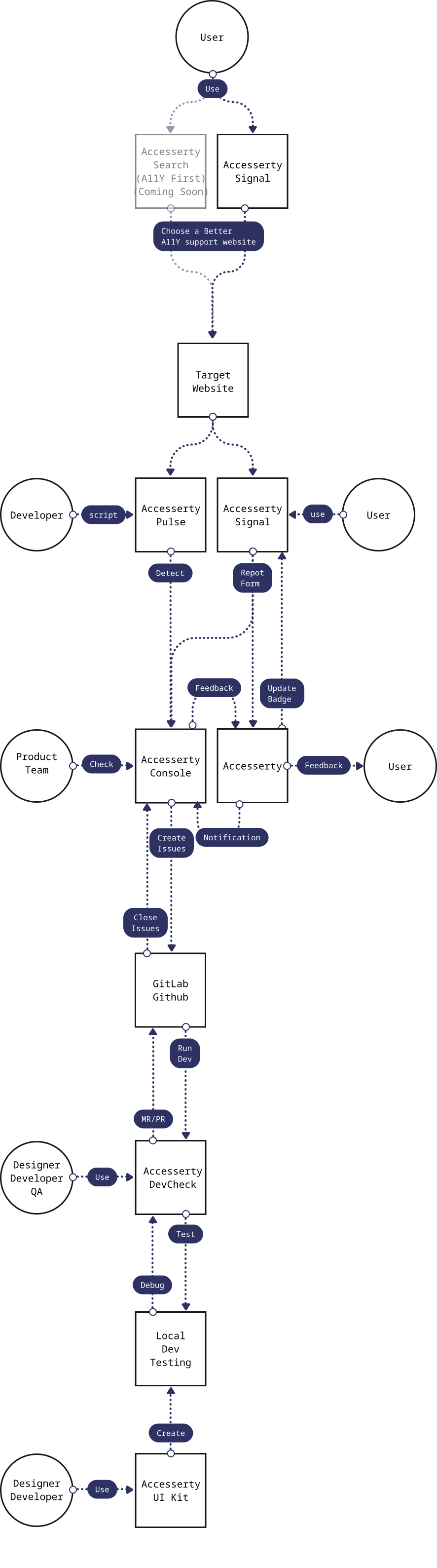
Accesserty does not treat accessibility as a one-time audit. People can notice public signals and report barriers, maintainers can use reports and interaction clues to decide what to inspect, and the people making changes can use tools to confirm and improve pages. These records are improvement clues, not a complete audit or compliance guarantee.
Have a data source, product question, or partnership idea?
Contact us to ask about a product, website accessibility, or a practical collaboration.