
About Accesserty
Learn why Accesserty puts people at the center of website accessibility, how its four tools support browsing, review, maintenance and development, and where human testing still matters.
What Accesserty is
Accesserty helps people notice and report website barriers, check pages, and build interfaces that are easier to use. Its tools support everyday browsing, website maintenance, page review, and development.
The aim is to give people a way to describe barriers and help maintainers return to the page to investigate. Reports, public records and scan results have different meanings; none replaces checking what a person can actually do.
How Accesserty works
Notice a barrier, identify the step affected, and involve the people responsible for content, design or code. After a change, repeat the task. Accessibility belongs in ongoing website work, not just a final check.
The diagram shows ways to take part through browsing, reporting, checking, monitoring and reusable components. It is not an automated pipeline: reports, interaction events and scan results still need separate interpretation and follow-up on the actual page.
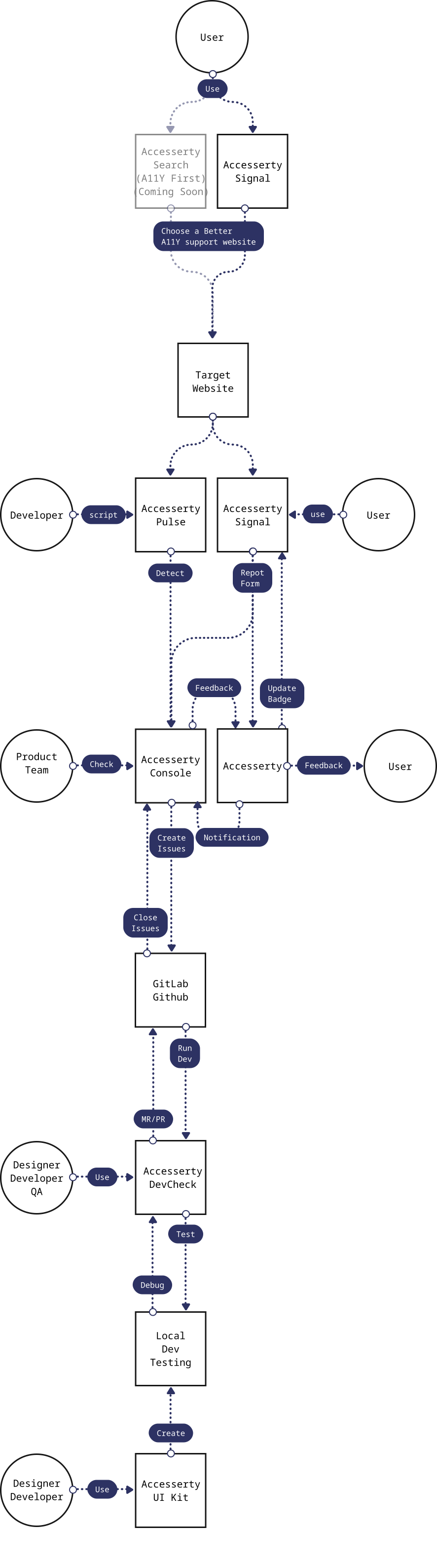
Accesserty does not treat accessibility as a one-time audit. People can notice public signals and report barriers, maintainers can use reports and interaction clues to decide what to inspect, and the people making changes can use tools to confirm and improve pages. The diagram shows the overall idea: Search, marked as planned, is not available yet; Signal provides traceable clues, not a guarantee that a website is easy to use; GitLab and GitHub stand for a team's existing issue workflow, which Accesserty does not connect to directly. These records are improvement clues, not a complete audit or compliance guarantee.
Vision
Make accessibility part of everyday website workWe believe access to information and digital services should not depend on a person's body, input method, or ability to work around a design oversight.
We want accessibility to be present in everyday search, reporting, monitoring, design, and development workflows, not opened only at the end of a project.
Mission
Turn observations into clues maintainers can review. Accesserty lowers the barrier to accessibility work in four practical ways:
- People browsing: find traceable information and a way to report barriers.
- Website maintainers: find pages that deserve investigation and follow up on reports.
- People reviewing pages: check real states and keep human judgment in the process.
- People building interfaces: reuse component foundations and test them in their own flows.
Choose a tool for your task
Accesserty Signal shows supported, traceable accessibility clues in search results and gives people a way to report barriers on the current page.
Accesserty Pulse helps verified website maintainers review interaction events and bounded scan summaries, with Pro priority pages and weekly reports. Review Signal reports separately in Console.
Accesserty DevCheck helps teams run browser-based checks on current page states, including local builds, staging pages, authenticated screens, and production pages.
Accesserty UI Kit provides MIT-licensed, HTML-first Web Components designed with accessibility and internationalization in mind.
What Accesserty does not claim
Accesserty does not certify websites, guarantee legal compliance, rank websites by accessibility, or replace professional accessibility audits, assistive technology testing, or real user feedback.
Signal clues should be read with their source and scope. DevCheck findings and AI-assisted suggestions need human review. Pulse events point maintainers to pages that may need investigation; they are not automatic root-cause diagnoses.
Our Core Values
1. Equity is Win-Win
Accessibility is not a separate area built only for a specific group. It is a basic quality of products and services intended for more people to use.
2. Technology Serves Humanity
Automation provides clues, and components cannot guarantee that an entire product conforms. Technology should lower the barrier to action while stating its limits and preserving the role of human judgment and real-user testing.
3. Amplify Silent Voices
A single number does not explain a root cause. Accesserty keeps public records, user reports, and interaction events as traceable clues so maintainers can return to the actual page and investigate.
How website maintainers take part
Start with Pulse installation and domain verification. While that access remains active, you can review Signal reports associated with that verification and decide whether to apply for Accesserty ALLY. ALLY is reviewed and requires ongoing maintenance; it is not an accessibility certification, and status may be revoked when active follow-up does not continue.
Verification controls access to website data, not legal ownership or accessibility. Removing and verifying a domain again does not restore earlier private Pulse records or Signal reports, even for the same account or a later maintainer. Before installation, read what is collected, who can access it and what removal means.
Official links
Website: https://accesserty.com/en/
Contact: [email protected]
LinkedIn: https://www.linkedin.com/company/accesserty/
GitHub: https://github.com/Accesserty
Frequently asked questions
Accesserty offers tools for noticing and reporting website barriers, reviewing pages, maintaining live sites and building interfaces with reusable Web Components.
No. Accesserty organizes public accessibility signals and provides tools for reporting, checking, and maintenance. It does not certify websites, rank websites, or guarantee legal compliance.
No. Accesserty products provide traceable signals and review aids. They do not replace professional audits, assistive technology testing, legal advice, or real user feedback.
For general service and partnership questions, contact [email protected].