
Accesserty DevCheck
Check a page before you release it, no accessibility background needed: find issues, judge what scanners can't, and show others why a fix matters.
For desktop Chrome, Edge and Firefox. Local checks are free; AI Check is optional and sends sampled content to Google Gemini.
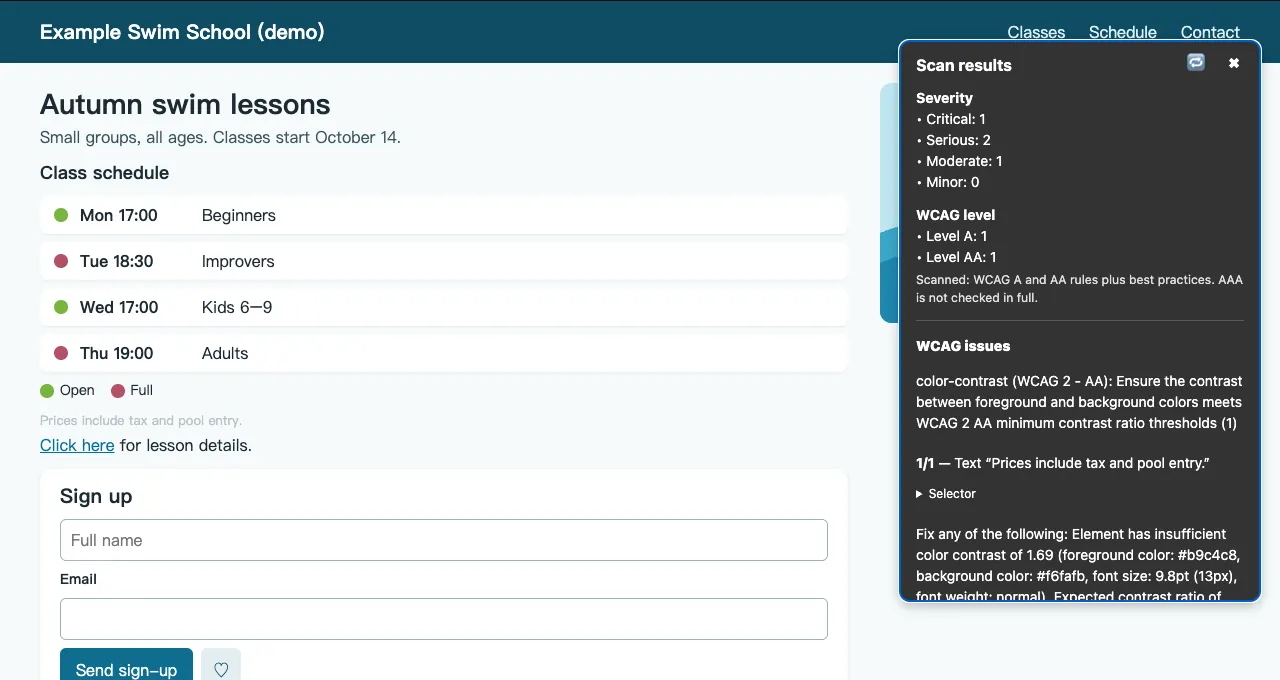
Find automatically detectable issues on pages you can check, including staging and signed-in views.
Choose an element from the results and check it on the page. After a fix, recheck the same state.
Check it yourself before release
Check staging sites, signed-in views and local builds in your own browser. Start with machine-detectable issues, then review the items that need human judgment.
Check a form after an error appears or a dialog opens. After a fix, return to the same state and check again so your team can review the result.
What DevCheck helps you do
In the order of a check: find the issues, judge what a scanner cannot, then help your team, manager or client see why a fix matters.
Find issues on the real build
Find machine-detectable issues and select an element in the results to locate it on the page. Copy a summary into your team's issue tracker, reviewing it before sharing.
Confirmed issues and items needing manual review are listed separately. No findings does not mean the whole page passes an audit.
Which rules does the scan cover?
axe-core checks machine-detectable WCAG 2.0–2.2 A/AA and best-practice issues. Affected elements have readable names; locating failures are reported.
Judge what a scanner can't
See the focus order, button names, and form labels and errors on the page to judge whether an interaction makes sense.
Focus Path estimates a route; it does not record Tab presses. Check it with the keyboard. Orange hints are not confirmed failures.
Which review lenses are available?
Focus Path, heading structure, landmarks such as navigation and main content, accessible names read by assistive technology, form labels and errors, a reading preview, and a stop-motion view that marks what still moves.
Show why a fix matters
Use color vision views, a magnifier or Silent mode to help your team notice information that depends on color, sight or sound.
Simulations offer review clues, not a complete representation of disabled people's experiences or a substitute for testing with users.
Which simulations are available?
Color vision differences, low vision, visual field loss, text spacing and reading-difficulty views, plus a magnifier following the mouse and keyboard focus. Hand tremor makes the cursor shake and clicks land at the shifted position; Silent mode flags page sounds and lists media without captions.
Check PDFs without uploading them
Select a local PDF to check tags, bookmarks, links, images, forms and page-size consistency without uploading it.
Results are structure clues, not verification of conformance to the PDF/UA accessibility standard. For now, confirm the document language in your PDF reader or editor; DevCheck showing “No language set” is not enough to establish a problem.
AI Check (optional)
Get suggestions for link purpose, language marking and image alternatives. If you choose AI Check, sampled content goes to Google Gemini.
It does not verify link destinations. Results show sampled and skipped counts, not whole-page coverage. Do not submit confidential or unauthorized content. AI suggestions are not a compliance guarantee; review them before use.
What does AI send?
Most checks run in the browser. Optional AI Check sends a bounded sample of page text, link names and surrounding text, plus selected page-readable images, their alt text and enclosing link or button naming context to Google Gemini only when you start it. Some hidden accessible names and SVG titles may be included. It omits dedicated page, destination and image-source URL fields, but URLs within sampled text, names or images may still be transmitted.
What it looks like on a page
These screens come from a fictional demo page, not a real site's results.
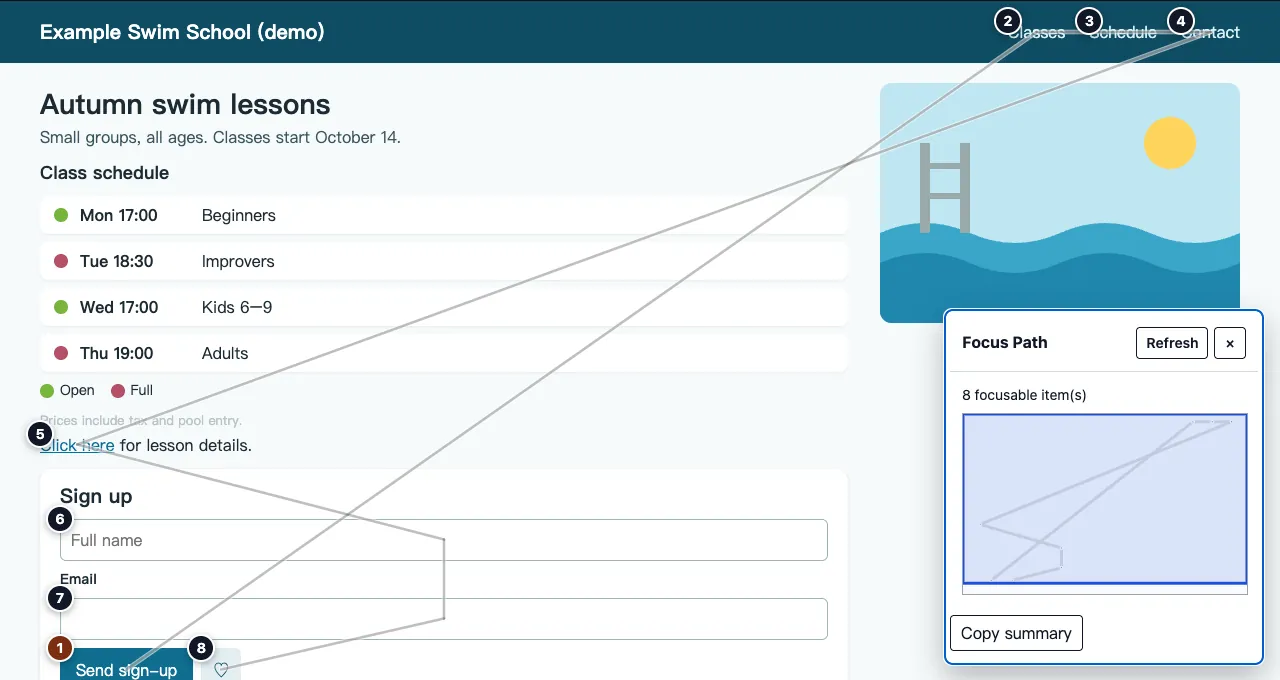
See keyboard focus order before you ship.
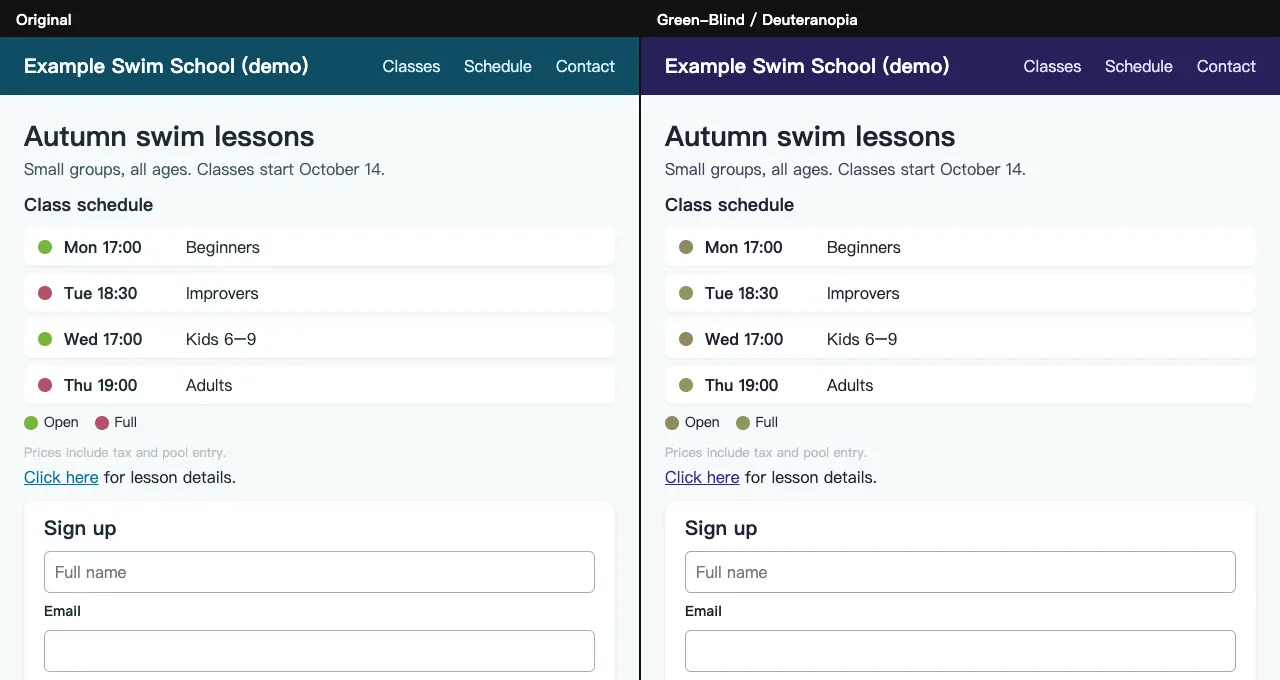
See what color alone fails to tell.
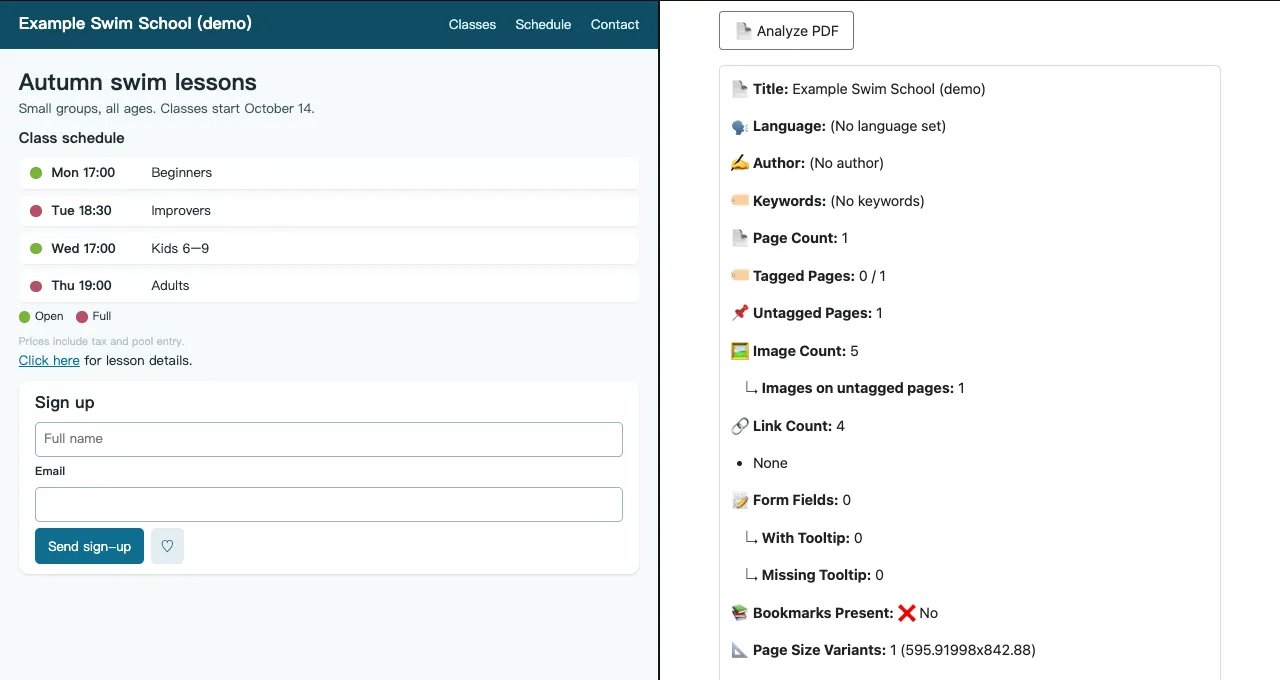
Check a PDF's structure without uploading it.
Who is DevCheck for?
- Anyone who checks pages before release
Designers, PMs, QA, content editors and engineers can all use it, with no accessibility background. Results keep confirmed issues apart from items that need a person to judge, name elements in plain words, and copy into your existing issue tracker.
- Teams delivering client sites
When a client's contract includes accessibility requirements, catch obvious issues on staging first, and when an audit report arrives, reproduce and re-test each item in the same page state.
- Teams building public-sector sites
Check before an accessibility review or acceptance testing. DevCheck works alongside the checkers you already use, adding keyboard focus, simulations and PDF checks.
- Component library maintainers
Before releasing components, check focus styles, accessible names and state colors. DevCheck reads open shadow roots and text projected through slots.
It does not replace a full audit
DevCheck does not replace accessibility expertise or a full audit. It is for checking your own work before release or handoff, discussing issues with your team or client, and re-testing fixes. It is not an ADA compliance checker or a legal certification tool. Formal accessibility audits still require human judgment, keyboard testing, assistive technology testing, and contextual review.
How to start checking
Install the browser extension (Chrome/Edge or Firefox), then open the page you want to inspect.
- Step 1. Install Accesserty DevCheck
Install the extension from the Chrome Web Store or Firefox Add-ons.
- Step 2. Open the page you want to check
Use a public page, localhost build, staging site or an authenticated interaction state. For a PDF, use the PDF checker under Scan to select a file from your computer; it does not directly inspect the browser’s built-in PDF viewer.
- Step 3. Scan, review and recheck
Start with Scan, then Review and actual keyboard testing; AI is not required. Review summaries before sharing them in your issue tracker, then re-test the same page state after a fix.
Local scans, review lenses, simulations and PDF checks are free, with no DevCheck paid plan. Optional shared AI has daily and rate limits. Your own Gemini API key uses Google quotas, pricing and data terms; it is not unlimited or necessarily free.
Install Chrome / EdgeInstall FirefoxUsed DevCheck? A store rating helps other people find it:Chrome Web Store or Firefox Add-ons
Try your first check
No code needed: open the practice page, scan it with DevCheck, find the button without a name, then apply the fix on the page and scan again. The practice page is fictional demo content, and AI is not needed.
Open the DevCheck practice page
Needs manual review is not a confirmed error. No findings does not mean the page conforms to WCAG.
Which content cannot be fully checked?
Want to try it on your own test page? See the HTML example
Put the first HTML snippet on a test page you can edit, such as a localhost development page. The button does not add data.
Before: only an icon hidden from assistive technology
<button type="button"><span aria-hidden="true">+</span></button>- Open the test page and DevCheck, then choose Scan → Scan this page. Do not use a browser settings page or an extension store page.
- Find the button-name rule in the results and inspect the listed element. Activate its element entry to try highlighting it on the page. Here, the name is missing because aria-hidden excludes the button’s only content.
- Confirm the button’s purpose, then use the version with visible text below. Do not add a name such as “button” merely to silence the finding.
- Reload the edited page and scan the same state again. This button should no longer produce a button-name finding. Still check keyboard access and operation, and the name announced by a screen reader. A working product also needs a test of the actual add-contact flow.
After: visible text explains the purpose
<button type="button">Add contact</button>Go deeper when you need to
You do not need to read every guide. Choose one for the task in front of you, and check PDFs separately when they are part of it.
Start with the page and release scope
Decide whether the review covers a public page, local build, staging page, authenticated flow, interactive state, or PDF.
Review keyboard and focus path
Check whether focus can move, whether the order makes sense, whether focus gets trapped, and whether the path matches the page context.
Turn findings into a remediation plan
Organize next steps by user task, impact scope, owner, repair level, and re-test method.
Frequently asked questions
Accesserty DevCheck is a free browser extension for anyone who checks pages before release or handoff, with no accessibility background needed. It finds issues on the real build with axe-core scans, helps you judge what a scanner cannot with Focus Path, Heading Structure, Landmark Regions and accessible names, and shows why a fix matters with simulations. It also checks PDF structure locally; AI Check is optional.
Local scans, review lenses, simulations and PDF checks are free, with no DevCheck paid plan. Optional shared AI has daily and rate limits. Your own Gemini API key uses Google quotas, pricing and data terms; it is not unlimited or necessarily free.
Yes. Scans, review tools, simulations and PDF checks run in your browser without sending the page to an external URL scanner. Optional AI sends sampled content separately; check that it is suitable to send and read the full disclosure first.
Browser-internal and store pages restrict extensions; use localhost for local development. Re-scan or refresh review lenses after interactions or content changes. Protected frames and closed shadow roots may not be locatable. PDF checks provide structure signals, not PDF/UA conformance. AI uses a bounded sample: editable content and some CSS-hidden text are excluded, but clipped text, accessible names and SVG titles may still be sent. URLs inside sampled content are not redacted. Some images and over-limit items are skipped; cross-origin protection, loading failures or encoding limits may also prevent image review.
Only starting AI sends sampled text, link/alt metadata and page-readable images; samples may include CSS-clipped text, hidden ARIA references and SVG titles. URLs within sampled content are not redacted. Shared AI passes through Accesserty for quotas; a custom key goes directly to Google. Under Google’s unpaid-service terms, inputs and outputs may support improvement and human review; custom keys still follow project billing status and applicable regional terms. Do not submit confidential, unauthorized or personal information to unpaid AI. Results distinguish complete, partial and unusable responses. Incomplete does not mean no issues, and submitted shared requests still count toward quota. Local copied/downloaded reports may include the page URL and sampled text; review before sharing.
No. DevCheck can help with preliminary accessibility checks and re-testing, but it does not provide an ADA legal compliance decision and does not replace a formal audit, assistive technology testing, or legal advice.
It is for anyone who checks pages before release: designers, PMs, QA, content editors and engineers, with no accessibility background needed. It also suits teams delivering client sites, teams building public-sector sites, and component library maintainers. It moves self-checks earlier without replacing accessibility experts or real-user testing.